A production autocomplete system is a race-safe search loop: it turns evolving input into a small, ranked, accessible suggestion list while keeping stale responses, slow networks, caches, keyboards, touch, and privacy under control.
Autocomplete looks like a small UI problem. A user types, a list opens, and clicking a row fills the input. That is enough for a component exercise. A system-design interview asks what happens around that component: where suggestions come from, which state owns them, how requests are scheduled, what happens when responses arrive out of order, how keyboard and screen-reader users navigate the popup, and how the team knows whether the experience works.
A coding prompt asks, “Can you implement this interaction?” The system-design version asks, “Can this interaction stay correct, fast, accessible, and diagnosable when the data and network stop behaving nicely?” You still discuss the component, but you spend more time on its contracts and failure modes than on JSX or framework syntax.
This guide designs a search autocomplete for a web application. It starts with the smallest correct model, then adds the production concerns that distinguish a reliable system from a demo. The same design applies to product search, people pickers, address search, command palettes, and mention pickers, but their selection rules and privacy boundaries differ.
Clarify the product before drawing boxes
Begin by asking what the field means. “Autocomplete” can refer to several products that look alike but have different contracts.
| Product | Can the user submit arbitrary text? | Typical source | Selection result |
|---|---|---|---|
| Search suggestions | Yes | Queries, entities, history | Run a search or navigate |
| Entity picker | Usually no | Users, projects, products | Store a stable entity ID |
| Address lookup | Sometimes | Geocoding provider | Store structured address data |
| Command palette | No | Mostly local commands | Execute an action |
| Browser form autofill | Yes | Browser or password manager | Fill saved form values |
This guide assumes a search box where free text remains valid. Suggestions help the user reach a query or entity faster, but the user may press Enter without choosing one. The service returns up to eight suggestions after two normalized characters. Results may use locale and coarse region, but not private history unless the user is signed in and the response is explicitly private.
Ask these questions in an interview:
- Is selection required, or can the raw query be submitted?
- Are results local, remote, or blended?
- Do suggestions represent text, entities, commands, or several row types?
- Is the experience personalized? Which context changes the result?
- What is the expected dataset size and request volume?
- Which browsers, languages, input methods, and assistive technologies matter?
- What should happen offline or when the suggestion service fails?
An interviewer may answer only two of them. State reasonable assumptions for the rest. Clear assumptions make trade-offs reviewable.
Set requirements and an explicit non-goal
The first version needs to:
- Preserve the text the user has actually entered.
- Fetch a small ranked list after a configurable pause.
- Never show a response for an older query as if it belonged to the current one.
- Support keyboard, pointer, touch, screen readers, and input method editors.
- Reuse recent results without returning private data to the wrong user or context.
- Keep free-text submit working if suggestions are unavailable.
- Record enough timing and outcome data to diagnose regressions.
Useful non-functional goals are concrete but not invented promises. For example:
- The input should respond to each keystroke immediately, even while network work is pending.
- The popup should avoid layout shifts and fit within the visual viewport on a phone.
- The service should degrade to plain search on timeout or error.
- Result commits should be deterministic under reordered responses.
- Logged query data should follow the product's consent and retention rules.
One explicit non-goal keeps the design honest: the browser does not compute global ranking. It owns interaction, local history if allowed, cache policy, presentation, and request correctness. The suggestion service owns corpus retrieval, policy filtering, and global ranking.
A short glossary
- Debounce: wait for a quiet period before starting work. A new input resets the timer.
- Abort: ask pending work to stop because its result is no longer useful.
- Request generation: a counter that gives each logical request a ticket number. Only the newest ticket may update the UI.
- Stale result: valid data for an older query or context that is no longer current.
- Cache key: the fields that decide whether stored data belongs to this request.
- TTL: time to live, or how long a cache entry counts as fresh.
- LRU: least recently used, an eviction rule that removes entries that have gone unused longest.
- Corpus: the searchable body of queries, products, people, documents, or commands.
- p95: the value that 95 percent of observed samples meet or beat. The slowest 5 percent are worse.
- IME: an input method editor used to compose characters that are not entered as a single keypress.
Estimate scale without pretending to know it
Scale estimates reveal pressure points. They are not facts about an unnamed product, so label them as assumptions.
Suppose the product has 2 million daily active users. If 25 percent use search, each search session produces 2.5 network requests after debouncing, and peak traffic is four times the daily average:
500,000 search sessions/day × 2.5 requests = 1,250,000 requests/day
average = 1,250,000 / 86,400 ≈ 14.5 requests/second
peak assumption = 14.5 × 4 ≈ 58 requests/second
That load is modest for a service. A large consumer product may be orders of magnitude higher, but the frontend design still benefits from request deduplication and caching because they reduce radio use, server work, and visible latency.
Estimate payload too. Eight compact suggestions at roughly 150 bytes each plus response framing may be around 1.5 to 3 KB. Images can make the response much larger. If avatars are optional, load them from stable CDN URLs and reserve their dimensions so rows do not jump.
The numbers to request from the real system are:
- Search sessions and request count at peak, split by region.
- Query length distribution and typing cadence.
- Response latency percentiles, not only the average.
- Result payload size and cacheability.
- Personalized versus shared traffic.
- Error, timeout, abandonment, and acceptance rates.
Draw the frontend boundary
The input should not know about fetch, caching, ranking metadata, or analytics. A controller coordinates those concerns and gives the view a small state object.

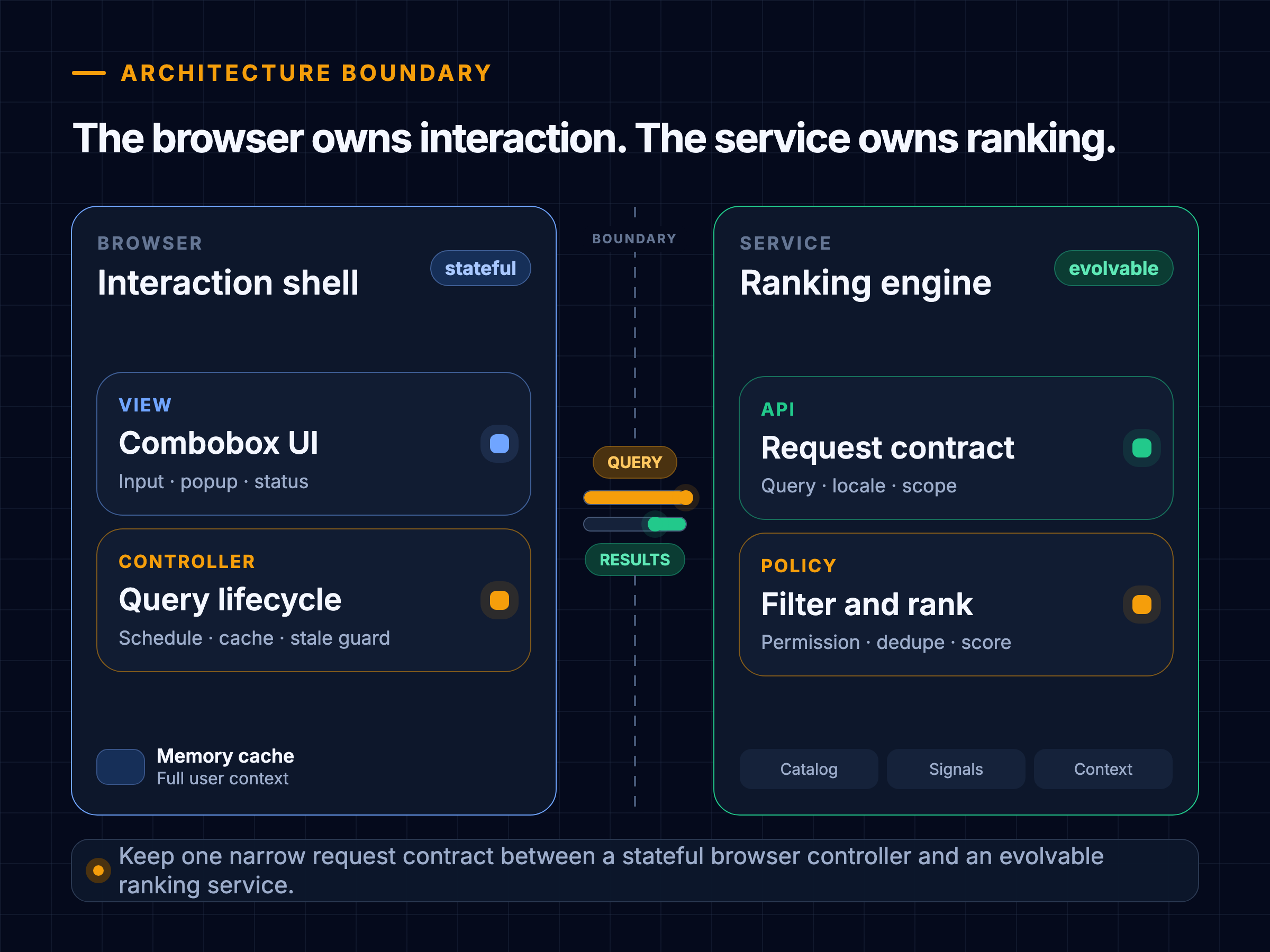
The main pieces are:
- Combobox view: renders the input, listbox, options, loading or empty state, and status text. It translates keyboard and pointer actions into intent.
- Autocomplete controller: owns the query lifecycle. It normalizes input, decides when to request, looks in the cache, cancels obsolete work, rejects stale responses, and exposes a stable state to the view.
- Memory cache: stores a small number of recent query results for the current context. An LRU policy is a reasonable default.
- Suggestion API: accepts a query and context, applies limits, and returns ranked items with stable IDs and display data.
- Ranking pipeline: blends sources, removes duplicates, applies safety and permission rules, and scores candidates.
This separation lets the same controller feed React, Angular, or Vue views. It also gives tests a clear seam: the request client and clock can be fake while the transition logic remains real.
Model state as facts, not scattered booleans
Start with the facts the UI needs:
type Suggestion = {
  id: string;
  kind: "query" | "entity";
  label: string;
  detail?: string;
  destination?: string;
};

type AutocompleteState = {
  inputValue: string;
  normalizedQuery: string;
  status: "idle" | "debouncing" | "loading" | "success" | "empty" | "error";
  suggestions: Suggestion[];
  activeIndex: number | null;
  popupOpen: boolean;
  errorMessage: string | null;
  requestGeneration: number;
};
inputValue and normalizedQuery are deliberately separate. The view must preserve the user's spelling and spacing while the cache and API may use a normalized form. Normalization might trim outside whitespace and apply locale-aware case handling. Do not silently remove meaningful punctuation or accents unless the search contract says it is safe.
activeIndex is presentation state. A stronger model stores activeSuggestionId, because an index can point at the wrong item when results change. If the active item disappears, clear it or choose a documented fallback.
Avoid contradictory booleans such as isLoading, hasError, hasResults, and isEmpty all living independently. A tagged status makes impossible combinations harder to create. For a larger implementation, model request state as a discriminated union so an error state cannot accidentally carry a success-only field.
The popup's visibility is not identical to request status. Cached suggestions may remain visible while a background refresh is loading. A failed refresh may leave useful stale results on screen with a quiet warning. Treat “what data do we have?” and “what work is happening?” as related but separate questions if the product needs that behavior.

Define the request lifecycle
For each input event:
- Update the controlled input immediately.
- If text composition is active, wait for composition to finish.
- Normalize the query.
- If it is below the minimum length, cancel pending work, clear suggestions, and close the popup.
- Increment the request generation. This invalidates all older work.
- Check the memory cache.
- If a fresh entry exists, show it immediately. Depending on policy, stop or refresh in the background.
- Wait for the debounce interval.
- Abort the previous fetch and start a new one with the captured generation.
- When it resolves, commit only if its generation and context still match the current state.
- Cache the valid result, update the popup, and record timing.
Here is framework-neutral TypeScript for the critical part:
let generation = 0;
let controller: AbortController | null = null;

async function loadSuggestions(rawInput: string, context: SearchContext) {
  const query = normalizeQuery(rawInput, context.locale);
  const mine = ++generation;

  controller?.abort();

  if (query.length < 2) {
    render({ status: "idle", suggestions: [] });
    return;
  }

  const cached = cache.get(cacheKey(query, context));
  if (cached?.isFresh) {
    render({ status: cached.items.length ? "success" : "empty", suggestions: cached.items });
    return;
  }

  controller = new AbortController();
  render({ status: "loading" });

  try {
    const result = await api.suggest(query, context, controller.signal);

    if (mine !== generation) return;
    if (query !== currentNormalizedQuery()) return;

    cache.set(cacheKey(query, context), result);
    render({
      status: result.items.length ? "success" : "empty",
      suggestions: result.items,
    });
  } catch (error) {
    if (isAbortError(error) || mine !== generation) return;
    render({ status: "error", suggestions: cached?.items ?? [] });
  }
}
The browser's AbortController.abort() can abort fetch requests, response body consumption, and streams. Use it to stop work that no longer matters. Keep the generation guard because cancellation may arrive after completion, a wrapper may not pass the signal through, or the transport may be replaced later.
Solve the stale-response race
Debounce reduces request count. It does not impose response order. Consider two requests:

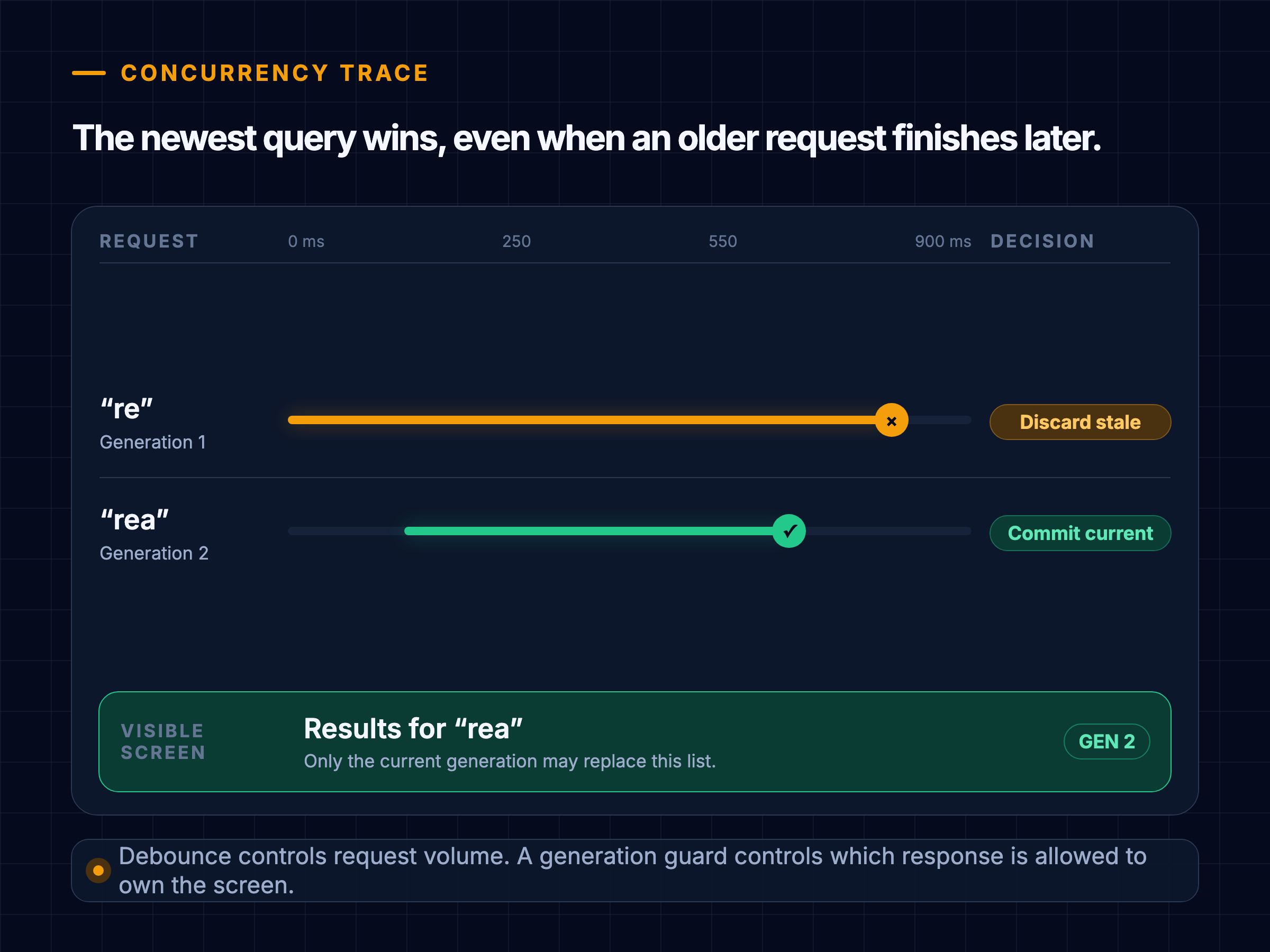
Try the same race below. “Accept every response” reproduces the bug. “Accept only the latest generation” preserves the invariant.
Interactive event trace
Which response owns the screen?
- No response painted
- Choose a policy, then run the trace.
The current query must be the owner of every visible result.
There are two useful guards:
- Generation guard: accepts only the newest logical request. It is simple and works across transports.
- Query and context guard: also checks that the response belongs to the current normalized query, locale, tenant, filters, and identity scope.
Use both when context can change without changing the visible text. For example, “san” may produce different suggestions after the user switches from products to people.
Choose debounce from evidence
A fixed delay of 150 to 300 ms is a common starting experiment, not a universal rule. A short delay feels responsive but generates more traffic. A long delay reduces traffic but makes the list feel disconnected from typing.
Debounce waits for a pause. Throttle allows work at a bounded cadence. Search suggestions usually begin with debounce because users often type several characters in a burst. A local command palette may filter synchronously on every input because there is no network cost. A slow remote provider may benefit from a slightly longer delay or an immediate cached response followed by refresh.
Make the delay configurable and measure:
- Keystroke to request start.
- Request start to response.
- Response to painted suggestions.
- Query change to visible suggestions, which is the user-facing total.
- Requests per search session.
- Percentage of requests aborted or discarded as stale.
- Suggestion acceptance and abandonment.
The delay can adapt cautiously. Zero delay for a fresh cache hit is sensible. Longer delays on a high-latency connection may save requests, but do not use reported network type as a substitute for observed latency. Keep the behavior predictable within a session.
Design a bounded cache
Autocomplete has strong short-term reuse. Users add and remove characters, reopen a field, or repeat a query. A small in-memory LRU cache often captures that reuse without the privacy and invalidation cost of durable browser storage.

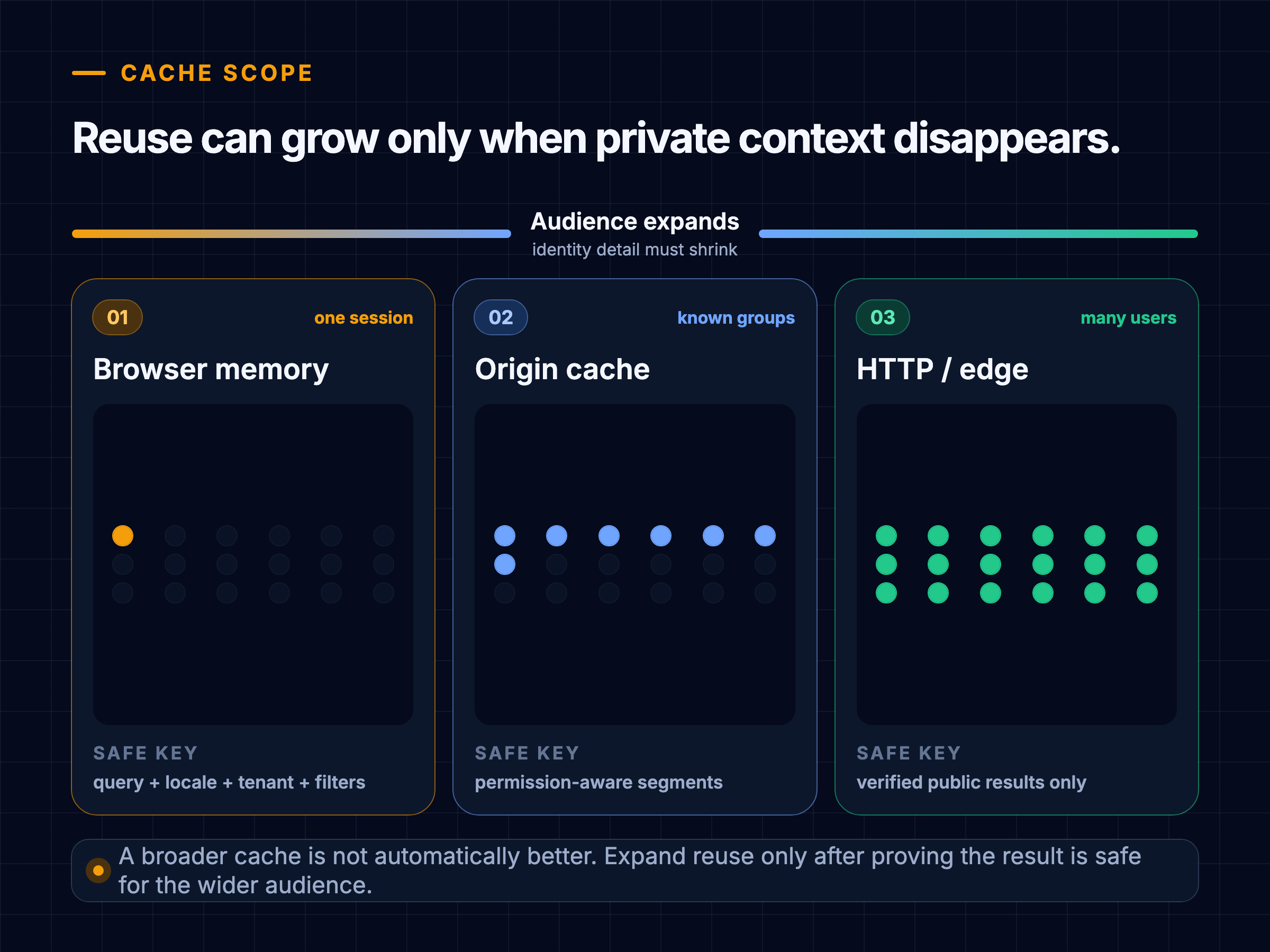
Interactive cache boundary
Can two users safely share this key?
rea · en-USRun Omar’s lookup to see whether Priya’s cached result can cross the boundary.
Cache test ready.
A cache entry needs at least:
type CacheEntry = {
  items: Suggestion[];
  storedAt: number;
  expiresAt: number;
  sourceVersion?: string;
};
The key may include normalizedQuery, locale, region, searchVertical, active filters, permission scope, and a user or anonymous-session partition when results are personalized. Never key only by query if two users can receive different data.
Reasonable policies include:
- Fresh entry: render immediately and skip the request.
- Slightly stale entry: render immediately, mark it as retained data internally, and refresh.
- Expired entry: request; optionally keep the old list visible until replacement if that is less disruptive.
- Empty result: cache briefly to prevent repeated misses, but use a shorter TTL if the corpus changes often.
- Error: do not cache as an empty success.
For public responses, explicit HTTP Cache-Control directives and validators such as ETags let browsers or intermediaries reuse or revalidate data. MDN's HTTP caching guide explains that validation can return 304 Not Modified instead of transferring the full representation. stale-while-revalidate, standardized in RFC 5861, can serve a stale cached response while refreshing it. Apply shared caching only to genuinely public variants.
Do not reach for prefix reuse too quickly. Results for “rea” are not always a filtered subset of results for “re” because ranking, fuzzy matching, and entity blending can change. Prefix results are useful as a temporary visual bridge only if the product accepts their semantics. Label the source in state and replace it when the exact query resolves.
Specify the API contract
A small GET endpoint is easy to cache and inspect:
GET /api/v1/suggestions?q=rea&limit=8&locale=en-IN&scope=all
Accept: application/json
GET is a good fit for public, non-sensitive suggestions. If queries commonly contain confidential data, use a POST contract with Cache-Control: no-store and accept that shared URL caching is no longer available. Changing the HTTP method does not remove the need for careful server logs and telemetry.
An example response:
{
  "query": "rea",
  "requestId": "sg_01K2...",
  "generatedAt": "2026-08-22T12:31:05Z",
  "items": [
    {
      "id": "query:react",
      "kind": "query",
      "label": "react",
      "matchedRanges": [[0, 3]],
      "scoreBand": "high"
    },
    {
      "id": "topic:react-router",
      "kind": "entity",
      "label": "React Router",
      "detail": "Library",
      "destination": "/topics/react-router",
      "matchedRanges": [[0, 3]],
      "scoreBand": "high"
    }
  ]
}
The response echoes the normalized query. That helps diagnostics and supplies another commit guard. Stable item IDs support keyed rendering and analytics. matchedRanges avoids making the client repeat matching rules merely to highlight text. Treat the ranges as data, not HTML.
The server should enforce:
- A maximum query length and maximum result limit.
- Authentication and authorization where the corpus is private.
- Locale and scope allowlists.
- Rate limits appropriate to a high-frequency typing endpoint.
- Deadline propagation to downstream retrieval services.
- Safe encoding and output handling.
Use a versioned contract or additive changes. New item kinds should not make an older client crash. Unknown kinds can render a plain text fallback or be skipped while an observability event records the mismatch.
Status behavior can stay simple:
| Response | Client behavior |
|---|---|
200 with items | Show items if the response is current |
200 with empty items | Show a quiet no-results state if current |
400 | Treat as a client-contract error; do not retry automatically |
401 or 403 | Refresh authentication once if allowed, otherwise degrade |
429 | Respect Retry-After, increase request restraint, keep free-text search |
5xx or timeout | Retry only if useful, retain safe cached data, allow normal submit |
Autocomplete rarely needs WebSockets. The user initiates each query, HTTP cancellation is straightforward, and independent responses cache well. Consider streaming only when partial results materially improve a slow blended search. Streaming adds partial ordering, cancellation, parsing, and announcement decisions to the frontend.
Keep ranking behind a stable boundary
The frontend needs useful result metadata, not the ranking formula. A service might retrieve candidates from:
- Prefix and fuzzy indexes.
- Popular or trending queries.
- Product or content entities.
- Recent searches stored under user consent.
- Locale and coarse regional signals.
Google describes its own search predictions as reflecting real searches, common and trending queries, location, and previous searches where applicable. That is a concrete product example, not a default recipe for every autocomplete. See Google's explanations of how autocomplete predictions work and how autocomplete operates.
The service can blend and score candidates, apply safety policy, remove duplicates, and return only presentation-safe fields. The client may blend a private local source, such as recent commands, with remote results. If it does, define deterministic rules:
- Partition rows by source or assign each source a quota.
- Deduplicate by canonical ID, not display text alone.
- Keep keyboard order identical to visual order.
- Decide whether a refreshed remote result may move the active item.
- Record source and rank at impression and acceptance time.
Avoid reshuffling a list under the pointer. If background refresh changes ranking, replace only when no option is active, preserve the active ID, or defer reordering until the next input event.
Build the accessible combobox contract
An autocomplete is not accessible because it has ARIA attributes. ARIA describes behavior; JavaScript and markup must implement that behavior.
The W3C combobox pattern is the starting point for an editable input with a suggestion popup:
- Give the input an accessible label.
- Use
role="combobox"where required by the chosen markup pattern. - Set
aria-autocomplete="list"for a list of suggestions related to typed text. - Point
aria-controlsto the popup listbox. - Reflect visibility with
aria-expanded. - Give the popup
role="listbox"and each rowrole="option". - Keep DOM focus in the input and expose the visually active option with
aria-activedescendant.

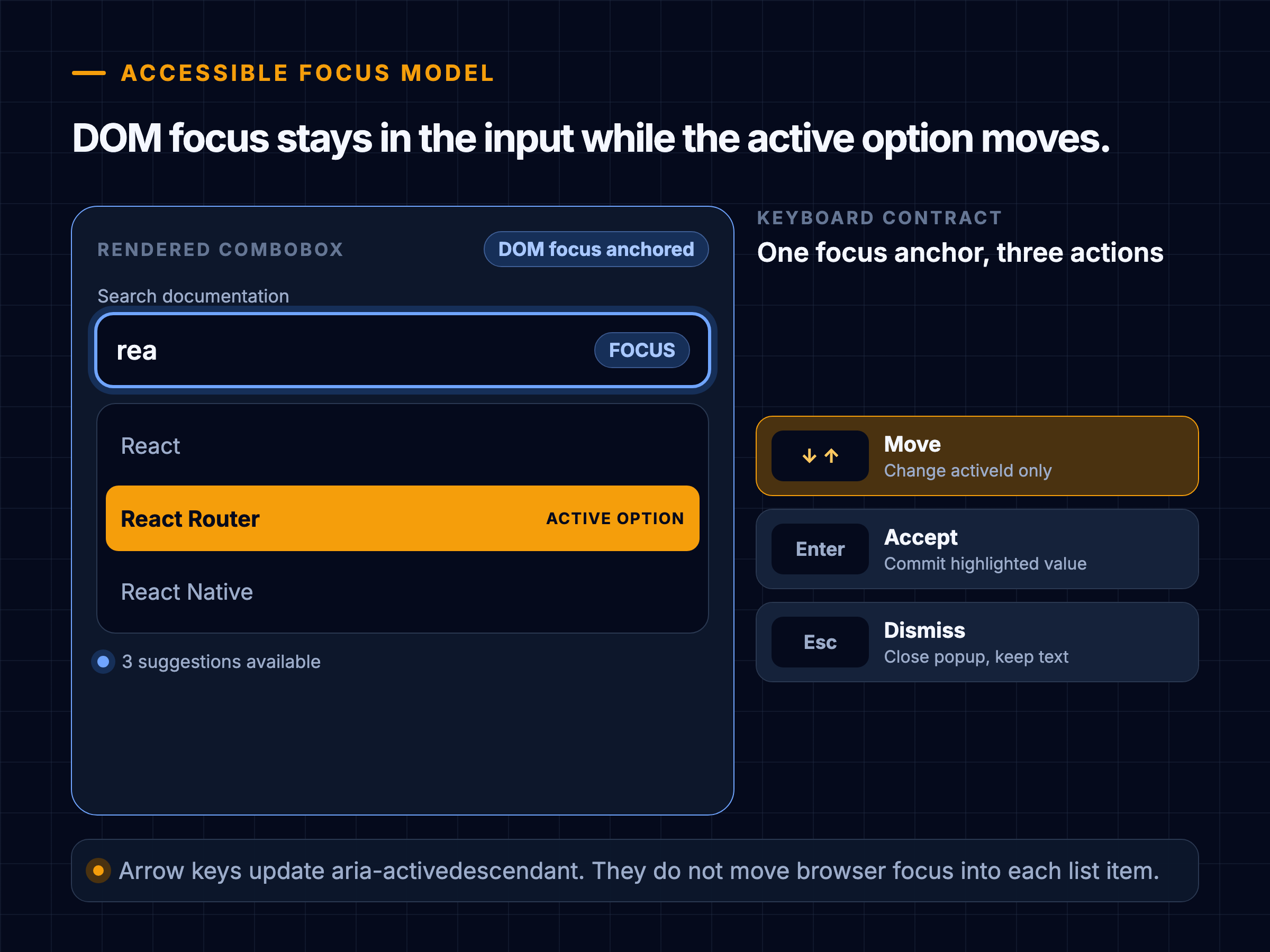
Keyboard and focus lab
Move visual focus without moving DOM focus
- React
- React Router
- React Native
_R_10l95_-option-0Try Arrow Up, Arrow Down, Enter, and Escape while the input stays focused.
3 suggestions available. React is active.
The W3C pattern specifies familiar keyboard behavior: Down Arrow enters the popup, Enter accepts an active suggestion, and Escape dismisses it. Standard single-line editing keys must keep working. The popup and its options normally do not become separate Tab stops.
When the active option changes, ensure it is scrolled into view. MDN's aria-activedescendant reference notes that DOM focus stays on the input while assistive technology receives the referenced option as active.
Use a separate status element for result counts, loading completion, and errors:
<div role="status" class="visually-hidden">
  3 suggestions available. Use Down Arrow to review.
</div>
The W3C technique for role="status" explains that status messages can be announced without moving focus. Do not announce every loading transition or every arrow-key movement twice. Test actual browser and screen-reader combinations because announcement timing varies.
HTML's autocomplete attribute is a different feature. It gives the browser a hint about saved form values and autofill. MDN documents those tokens in the HTML autocomplete reference. aria-autocomplete describes the suggestion interaction to assistive technology. One does not replace the other.
Handle keyboard, pointer, touch, and composition
Input systems overlap. A robust interaction model defines how each event affects selection and dismissal.
Keyboard rules:
- Arrow Down opens the popup if suggestions exist and moves to the first or next item.
- Arrow Up moves to the previous item and may wrap only if the product documents that behavior.
- Enter accepts the active item. With no active item, it submits the raw query.
- Escape closes the popup without clearing the input. A second Escape may clear it if that is a deliberate product convention.
- Home, End, Left, Right, Backspace, and platform editing shortcuts continue editing text unless the popup pattern explicitly owns them.
- Tab follows the product's form behavior. Do not silently select a suggestion on blur unless users expect it.
For pointer selection, pointerdown may fire before the input's blur. If blur closes and removes the popup first, the later click has nothing to select. Common solutions are to handle selection on pointerdown, or to keep the popup alive while focus moves within the component. Do not sprinkle arbitrary timeout delays around blur; model focus ownership explicitly.
On touch devices:
- Keep rows large enough to tap comfortably and leave space between destructive or unrelated actions.
- Place the popup within the visual viewport when the software keyboard is open.
- Avoid hover-only information.
- Preserve typed text when orientation or viewport height changes.
- Test page zoom and text enlargement.
Users entering Chinese, Japanese, Korean, and other composed text may produce several intermediate input events before choosing a final character. InputEvent.isComposing reports whether an input event occurs between composition start and end, according to MDN. Avoid firing a remote search for incomplete composition text. Resume on compositionend, while accounting for browser event ordering in tests.
Keep rendering cheap and stable
Most suggestion lists should contain five to ten rows. That is too small to justify virtualization. Render semantic options, use stable keys, and keep row layout predictable.
Performance work should target the full interaction path:
- Update the input value without waiting for network state.
- Keep expensive normalization, client filtering, and highlighting out of the keystroke's synchronous path.
- Memoize only measured expensive work. Do not add memoization around trivial row rendering by habit.
- Reserve avatar or icon dimensions.
- Limit response fields and image sizes.
- Preconnect only when the suggestion origin is known and the connection will likely be used.
- Abort obsolete requests and deduplicate identical in-flight queries.
- Avoid remounting the input or popup on every state change.
Google's web performance guidance considers an Interaction to Next Paint of 200 ms or less good at the 75th percentile for a site's visits. That is a page responsiveness benchmark, not a suggestion-service SLA. Track autocomplete-specific spans with the User Timing API, then correlate them with INP and long tasks.
Useful marks are:
performance.mark(`suggest:${requestId}:input`);
performance.mark(`suggest:${requestId}:request`);
performance.mark(`suggest:${requestId}:response`);
performance.mark(`suggest:${requestId}:paint`);

performance.measure(
  "autocomplete-query-to-visible",
  `suggest:${requestId}:input`,
  `suggest:${requestId}:paint`,
);
Sample measurements rather than logging every keystroke from every user. Custom metric guidance on web.dev covers User Timing and PerformanceObserver collection.
Design failure and offline behavior
Autocomplete is an enhancement to search, so its failure should not block search.
Distinguish states the user can act on:
- No results: “No suggestions for ‘xyz’.” Free-text submit still works.
- Slow: keep the input interactive. A subtle loading indicator can appear after a short threshold so fast responses do not flicker.
- Offline: show safe local history or commands if available, and explain that live suggestions are unavailable.
- Service error: retain still-relevant cached suggestions or hide the popup. Do not replace an actionable list with a large error panel.
- Rate limited: back off and allow submit. Repeated automatic retries can make the limit worse.
- Authentication expired: attempt the application's normal single refresh path, not a refresh per keystroke.
Retries need a budget. A suggestion that arrives after the user has already submitted has little value. One bounded retry for a transient failure may be reasonable only while the same query remains current. Use jittered backoff for repeated attempts, respect server instructions, and cancel the retry when input changes.
Offline history is a product and privacy choice. If stored, provide a clear way to remove it, partition it by account, and clear it on sign-out where appropriate. Do not claim that navigator.onLine proves reachability; treat an actual request result as stronger evidence.
Protect security and privacy
Queries may contain names, health concerns, internal project titles, account numbers, or text pasted into the wrong field. High-frequency logging can turn a small interface into a large sensitive dataset.
Set boundaries early:
- Collect query text only when the product has a lawful purpose, user expectation, access policy, and retention period.
- Prefer aggregate metrics or sampled, redacted values where raw text is unnecessary.
- Never put credentials or highly sensitive data in query parameters. URLs may appear in histories, logs, and intermediaries.
- Partition caches by identity and permission context.
- Clear private memory caches on sign-out or tenant change.
- Rate limit and validate the endpoint.
- Return plain display strings and structured highlight ranges.
Render suggestion labels as text. Do not accept a server-provided HTML string and place it into innerHTML. Modern frameworks escape text bindings by default, while bypass APIs require careful output encoding and sanitization. The OWASP XSS prevention cheat sheet gives context-specific guidance and treats Content Security Policy as defense in depth, not the only control.
For telemetry, OWASP recommends removing, masking, sanitizing, hashing, or encrypting sensitive information rather than recording it directly. See the OWASP logging guidance. A practical event can record query length, source, rank, timings, result count, and an ephemeral request ID without storing raw query text.
Instrument outcomes, not vanity traffic
Request count alone cannot tell whether suggestions help. Define events around the user journey:
type AutocompleteEvent =
  | { type: "request_started"; requestId: string; queryLength: number; cache: "miss" | "stale" }
  | { type: "results_shown"; requestId: string; count: number; latencyMs: number; cache: "memory" | "http" | "origin" }
  | { type: "suggestion_accepted"; requestId: string; suggestionId: string; rank: number; input: "keyboard" | "pointer" }
  | { type: "free_text_submitted"; queryLength: number; suggestionsVisible: boolean }
  | { type: "request_discarded"; reason: "aborted" | "stale_generation" | "context_changed" }
  | { type: "request_failed"; category: "timeout" | "network" | "rate_limit" | "server" };
Measure:
- Query-to-visible latency at p50, p75, p95, and p99.
- Acceptance rate by rank and source.
- Free-text submission and abandonment.
- Zero-result and error rates.
- Requests per session and characters per request.
- Memory and HTTP cache hit rates.
- Stale responses discarded.
- Interaction responsiveness and long tasks.
Segment by device class, effective observed latency, locale, geography where lawful, and experiment. A high acceptance rate is not automatically good if the first item is selected accidentally by aggressive keyboard behavior. Pair quantitative changes with usability and accessibility testing.
Use request IDs to correlate browser and service spans, but never let an analytics call delay rendering or navigation. Send impression events only after results become visible. If a list is replaced before paint, it was not an impression.
Test the system in layers
Unit tests cover normalization, cache keys, LRU eviction, debounce scheduling, generation guards, highlight ranges, and state transitions. Use a fake clock so request order is exact.
The race test is essential:
it("does not commit an older response", async () => {
  const first = deferred<Response>();
  const second = deferred<Response>();
  api.suggest.mockReturnValueOnce(first.promise).mockReturnValueOnce(second.promise);

  controller.input("re");
  clock.advanceBy(200);
  controller.input("rea");
  clock.advanceBy(200);

  second.resolve(responseFor("rea", ["React"]));
  await flushPromises();
  expect(view.query).toBe("rea");
  expect(view.items).toEqual(["React"]);

  first.resolve(responseFor("re", ["Redux"]));
  await flushPromises();
  expect(view.query).toBe("rea");
  expect(view.items).toEqual(["React"]);
});
Component tests cover:
- Accessible name, roles, relationships, and expanded state.
- Arrow navigation, Enter, Escape, Tab, and standard editing keys.
- Active item preservation when results refresh.
- Pointer selection without a blur race.
- Empty, loading, error, cached, and stale-refresh states.
- Composition events and Unicode input.
- Long labels, duplicate labels with distinct IDs, and mixed result kinds.
Integration tests use a controllable fake server to reorder, delay, reject, and partially return responses. Test identity and tenant changes against cache partitioning. Verify that aborted work does not produce a user-facing error.
Browser tests should include keyboard-only use, zoom, narrow visual viewports, reduced motion, high contrast, and at least the supported screen-reader and browser pairs. Automated accessibility checks find missing attributes but cannot prove that announcements are useful or that focus behavior makes sense.
Load tests belong on the API, while real-user monitoring validates the frontend. Include cache-busting traffic, popular prefixes, long Unicode queries, and a sudden trend that invalidates yesterday's hot-cache assumptions.
Explain the design in an interview
A clear 35-minute answer can follow this sequence:
- Clarify for 3 minutes. Define whether text submission is allowed, result sources, personalization, scale, and accessibility expectations.
- State requirements for 3 minutes. Name the current-query invariant and plain-search fallback.
- Draw the boundary for 5 minutes. Input and list, controller, memory cache, HTTP API, ranking service, data sources.
- Walk one query for 7 minutes. Input update, composition handling, minimum length, cache, debounce, abort, generation guard, commit.
- Deep dive for 8 minutes. Choose races, caching, accessibility, or ranking based on interviewer interest.
- Cover failure and measurement for 5 minutes. Slow network, errors, privacy, request and outcome metrics.
- Close with trade-offs for 4 minutes. What ships first and what waits for evidence.
Do not spend the first ten minutes drawing backend indexes before defining selection behavior. The question is frontend system design. Show that you can draw a backend boundary, then return to browser state, interaction, and failure semantics.
If time is short, say this:
I would keep input updates synchronous, debounce remote work, abort the previous fetch, and guard every response with a request generation and current context. A small scoped memory cache gives instant reuse. The view follows the editable combobox pattern, keeps focus in the input, and exposes the active option with
aria-activedescendant. The system falls back to normal search when suggestions fail, and I would measure query-to-visible latency, acceptance, zero results, errors, and discarded stale responses.
Make sensible first-version choices
A strong first version is intentionally boring:
| Decision | First version | Revisit when |
|---|---|---|
| Transport | HTTP request and response | Partial streaming has measured value |
| Scheduling | Configurable debounce | Field data shows a different cadence |
| Correctness | Abort plus generation and context guards | Never remove the commit guard |
| Browser cache | Small in-memory LRU | Cross-session reuse clearly outweighs privacy and invalidation costs |
| Result count | 5 to 10 ranked rows | Research shows users need deeper browsing |
| Rendering | Normal DOM list | A real use case needs hundreds of local options |
| Ranking | Server-owned contract | Local sources need an explicit blend policy |
| Failure | Preserve free-text submit | Product requires a constrained entity selection |
| Accessibility | Editable combobox and listbox | A different popup type is genuinely required |
The most common overdesigns are WebSockets without a streaming need, persistent storage without a privacy model, virtualization for eight rows, and a global state store for one field. The most common underdesigns are stale-response bugs, cache keys that omit context, missing IME handling, pointer blur races, and ARIA attributes without matching keyboard behavior.
The goal is not maximum machinery. It is a small set of explicit contracts that keep the suggestion list fast, correct, usable, and observable as the product grows.
Source notes
The accessibility behavior in this guide follows the W3C combobox pattern, the WAI-ARIA 1.2 specification, and W3C guidance for keyboard interfaces. Browser behavior references use MDN documentation for AbortController, aria-activedescendant, aria-autocomplete, HTML autocomplete, and IME composition state. Security recommendations use OWASP's XSS prevention and logging cheat sheets.